Times (Session Efficiency Analysis)
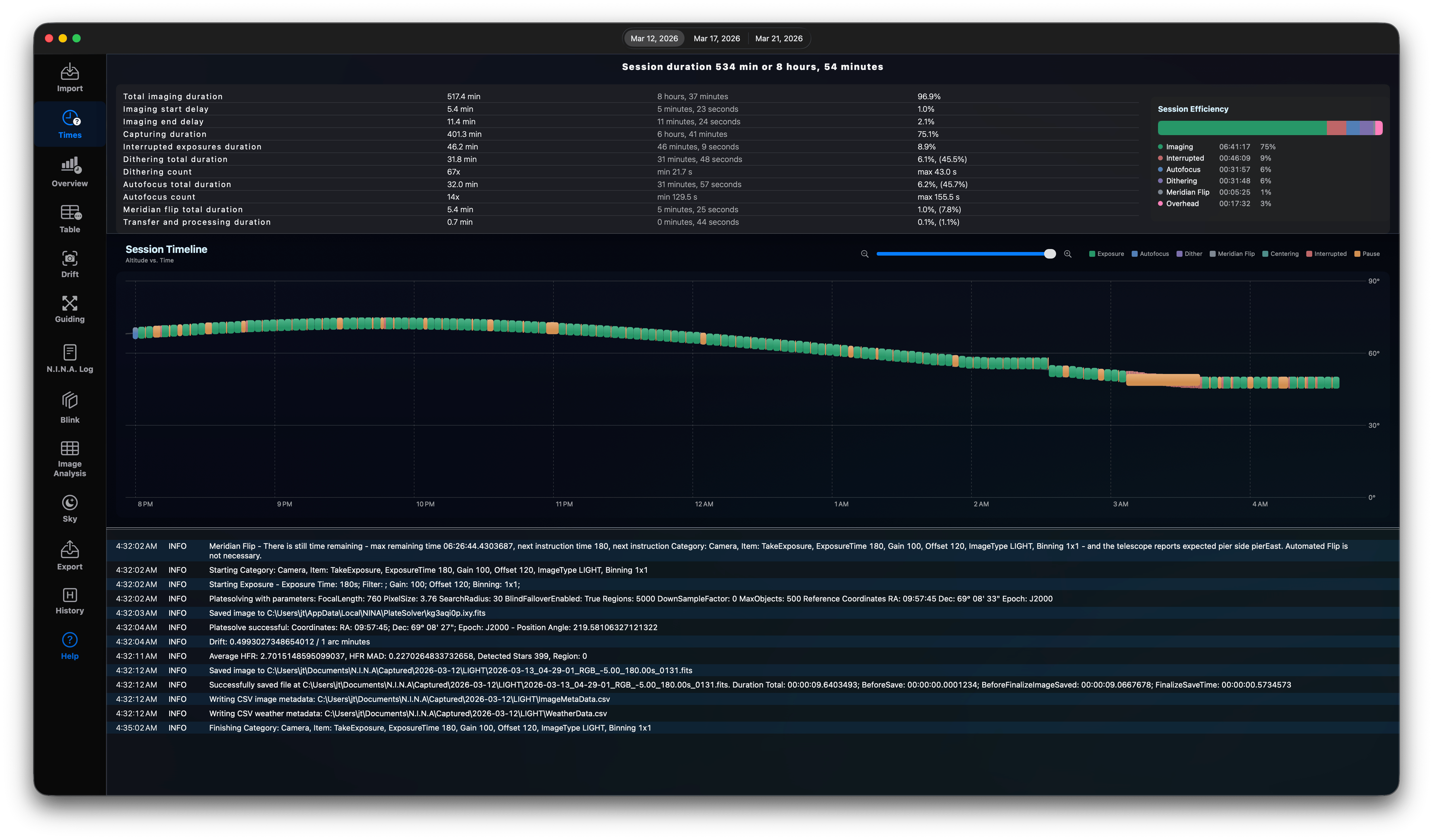
The Times view maps your session timeline, helping you identify where time is spent and how to maximize exposure efficiency.
Tabulated Session Views
If your log files contain details of multiple consecutive nights, the view renders a Date Tab View. Selecting a tab displays the StatisticsView for that specific night.
* If log entries do not correlate with exposures, the view displays a warning prompting you to check for timezone mismatches.
Session Statistics & Efficiency
Overall Time Dashboard
Shows a summary header outlining: - Session Duration: The total elapsed time between the first and last log entries. - Sequence Duration: Total exposure time spent capturing lights. - Efficiency Percentage: (Sequence Duration / Session Duration). Targets above $85\%$ indicate a highly optimized sequence.
Efficiency Grid
Displays category metrics calculated: - Light Exposures: Total frames, exposure length, and percentage of night. - Lost Time: Calculated overhead between exposures. - Dithering Time: Total time spent waiting for the mount to drift and settle. - Autofocus Time: Duration of all autofocus runs.
Interactive Timeline & Logs
The bottom half of the view displays the Session Timeline:
- Renders a horizontal bar representation of the night.
- Color codes represent activities: exposures (filter colors), dithering (yellow), autofocus runs (purple), and idle time (gray).
- Log Details Integration: Clicking any event on the timeline displays the raw N.I.N.A. log excerpt (showLog) around that specific timestamp, letting you identify why a download took too long or why autofocus was triggered.\n
Why do you need this
You want to maximise the number of captured lights and therefore you will need to know where you are loosing time. Check, how many time these things are consuming and try to reconfigure your session settings:
- Autofocus: too many useless Autofocus runs will just waste your time.
- Interrupted: when you have a trigger to interrupt a running exposure on high RMS values check these times. It might be okay and not a waste of time, but maybe your settings are too aggressive?
- Dithering: It depends on the exposure time and the number of lights captured how often you need to dither. In general this is not wasted time, but if you need to maximise your captured lights everything might count.
- Meridian Flip: how many time takes the meridian flip? Maybe, your settings for the Meridian Flip can be optimised.
- Overhead: Other things such as recenter the mount might sum up. You can reduce this by increasing the number of lights captured between each check in N.I.N.A., but this requires some experience with your gear.
- Zoom in on the Gantt chart and have a look at the times between each light.